Sunday, August 8, 2021

HTML5 - Hover

Hover Tabs

Move the mouse over a button inside the tabbed menu:

Music

Link to My Music.

Diary

Link yo My Diary Page.

Journey

Link to My Journey Page.

Wednesday, March 10, 2021

Drawing like picture_photoshop

Duplicate picture > invert > convert to smart object >  Gaussian blur > color dodge (beside opacity)

(Click at the half round icon below the layers) create new fill or adjustment layers > levels >

create new fill or adjustment layers > black and white

Select all > all > edit > copy merge > edit > paste

Filter > filter gallery > stylize > glowing edges > minimize edge width, max brightness

Image> invert > multiply > opacity 70%

New layer > white > filter gallery > texturizer> sandstone> multiply> opacity 70%
Tuesday, December 22, 2020

Sharing and embedding files from Adobe XD


I have been looking for ways to replace my flash files for my interactive title head, I wonder Adobe XD is my answer?

UPDATE: After looking at it, the lack of an important but basic feature of adding external links to it's button make this a failure. Another disappointment. It's been 2 years I've been looking  for a way to replace my flash interactive title head, and still.... Comes back to this, how in the world can I upload my converted flash to HTML 5 files?

Thursday, June 4, 2020

Calculation of Converting a Warrant

After some google ing and readings from different source, my conclusion and understanding about warrants;

*Company Warrant (WA/WB.....)
is issued by the company and Convertable to mother share;

Formula:
Warrant Price x Exercise Ratio + Exercise Value = The amount you spend to own the company share

Example:

Share Price : RM 0.56
Warrant Price : RM 0.11
Exercise Value : RM 0.54
Exercise Ratio : 1:1

RM0.11 x 1 + RM0.54 = RM0.65

You have paid RM0.65 to own a share that worth only RM0.56 at that current share price.
 Means you have paid extra RM0.09 or 16% premium for owning the share.

Share Price 0.56 - Exercise Value 0.54 = 0.02/1.
At the current share price of RM0.56, the warrant is only worth RM0.02


*Call Warrant (C10/.....)
is issued by third party financial institution and Cash settled on expiry.
Cash is settled only if the share price is higher than the exercise price.

Formula:
(5 days average of last Closing Price - Exercise Price) x /Exercise Ratio = Amount of Cash Receive

Example:

Share Price : RM11.7
Call Warrant Price : RM0.6
Exercise Value : RM7.6
Exercise Ratio : 7:1

(RM11.7 - RM7.6) /7 = RM0.586

You have paid RM0.6/warrant, But you'll only receive RM0.586 in return when expired.

Please correct me if I'm wrong.


Saturday, May 23, 2020

Copyright Free footages

Just happen to bump in to a video and wanna note this down;

PEXELS giving copyright free footages

INTERNET ARCHIVE and of course

YOUTUBE audio library.


Monday, May 11, 2020

Embed Flash via object tag and embed

<-------------------------------------------------------------------------------------------------------------------->

<object align="center" classid="clsid:D27CDB6E-AE6D-11cf-96B8-444553540000" codebase="http://download.macromedia.com/pub/shockwave/cabs/flash/swflash.cab#version=6,0,0,0" height="250" id="movie" width="920">
 <embed src="YOUR SOURCE.swf" quality="high" allowscriptaccess="always" width="920" height="250" name="movie" align="center" type="application/x-shockwave-flash" pluginspage="http://www.macromedia.com/go/getflashplayer" />
 <param name="movie" value="movie.swf" />
</embed></object>

<-------------------------------------------------------------------------------------------------------------------->

Thanks to :
https://perishablepress.com/embed-flash-and-video-via-the-object-tag/

Friday, April 10, 2020

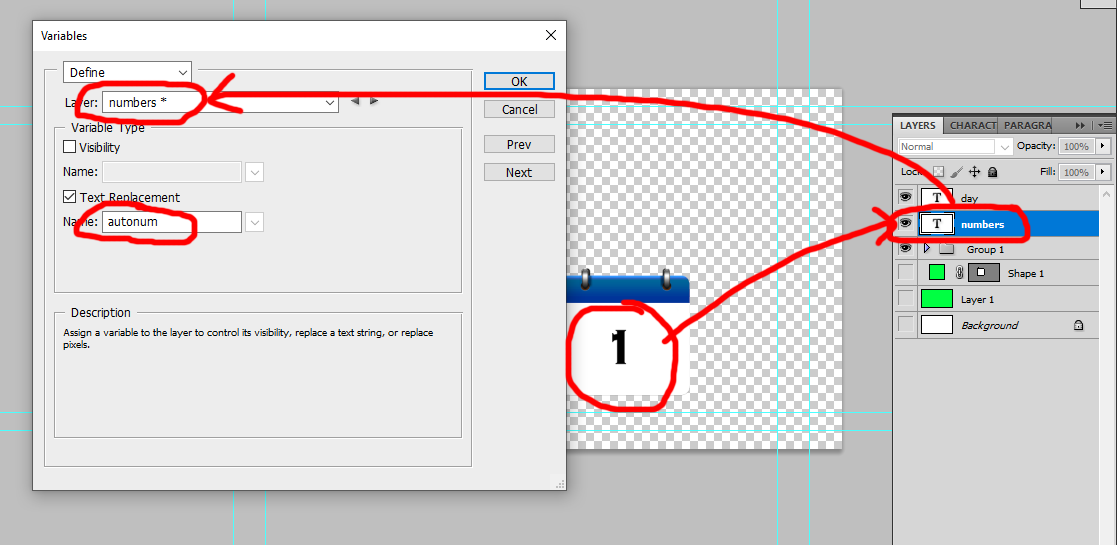
Automate variables in Photoshop


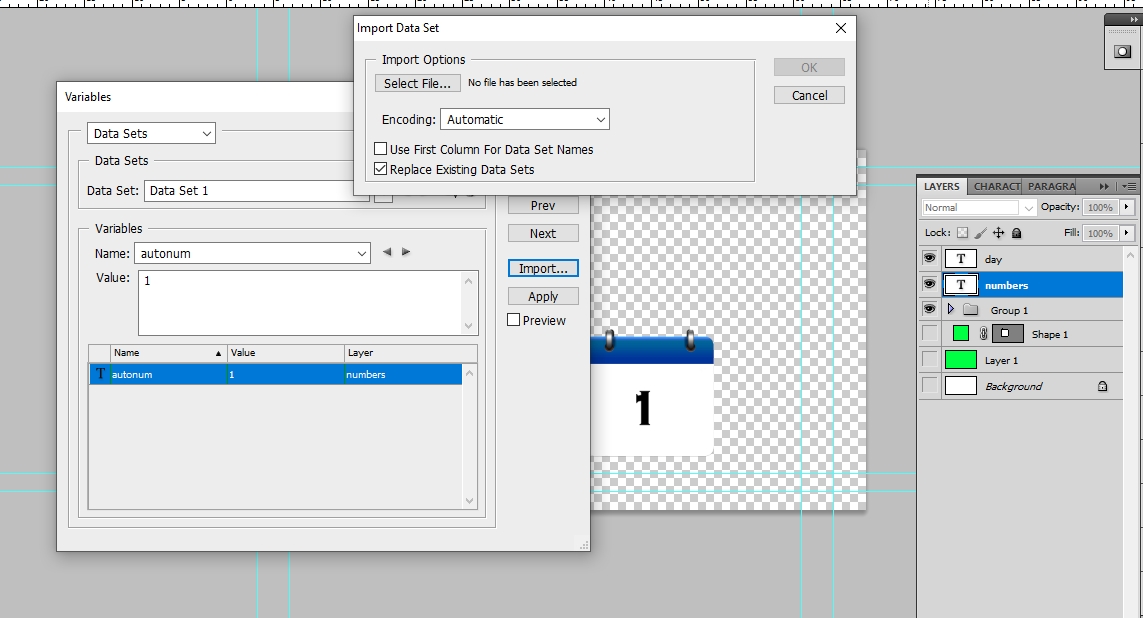
- Rename layer as "numbers"

Goto Image > Variables> Define

- select layers as numbers
- tick text replacement and name as "autonum"

Goto excel

first columm type autonum,
then type in number desire, and drag to the desire amount.

Export as csv file with the name numbers.


In photoshop.

Goto Image > Variables > DataSets

- Import csv file.>ok


File > Export > Data Sets as Files

it can only be exported as psd file.
other formats may needs to batch export from the psd files.

Monday, March 2, 2020

HTML 5 Canvas_ clock ticking


Cool.
source:https://www.w3schools.com/graphics/canvas_clock_start.asp

Tuesday, February 11, 2020

AE_pixelate effect

Note. This is how to turn motion into a pixelate image.

Wednesday, September 6, 2017

after effects 3D text

create text layer > type text > tick 3d icon > Renderer : change to Ray-traced 3D >
create camera layer on top > choose 50mm
---- under text layer > select Geometry option > increase extrusion depth >
create light layer > select color > tick shadow> ok > adjust light position
---- under text layer > Geometry option > Bevel style > choose angular > increase bevel depth
                                > material option > increase spectacular intensity
                                                             > reduce spectacular shininess
some effect notes:
- venetian blinds
- text bounce
- transform > skew
- cc scatterize
- 3D camera tracker
- ramp ( work like tint with gradient )
- shatter ( map image into certain shape activate 3D )

Saturday, September 2, 2017

Adobe After Effects - Motion Tracking and Stabilizer

Stabilizer
Window > tracker > highlight footage > stabilize motion > select 2 point > analyze (play) > apply X&Y


Tracking
- new Null Object (above footage)
- Window > tracker >  ( select footage ) track motion > select point > analyze (play) > Edit target to Null Object > Apply
- New text > parent to null object

Wednesday, July 27, 2016

photoshop BATCH RESIZE

Create 2 folder  
1. Original Image
2. Resize

In Photoshop
> Open 1 picture
> Windows > Actions > New Action > Rename & Record
> Resize Image > Save as (into resize folder) don't rename
> Close Image > click stop button

> File > Automate > Batch > Choose Source & destination folder
> OK


Thursday, March 3, 2016

Shortcut key for © Copyright

Alt 0169  ©
Alt 0153  ™
Alt 0176  °     opt k (mac)


Sunday, February 7, 2016

Cleaning Final Cut Pro

User > fcp19(home) > Library > Preference 
        > com.apple.FinalcutPro.plist (delete)

Preference > Final Cut Pro User Data
                     *delete 3 fcp files

shortcut keys_FCP&PremierePro

For my own reference;

FCP                                                                  Premiere Pro

Toggle Clip Overlay                      Option W
Toggle Timeline Track Height        Shift T
Add Edit                                       1                                  (Application>Sequence>Razor All Tracks)
Gain                                              Control +
Toggle Clip Enable                        E                                 (Application>Clip>Enable)
Make Freeze Frame                      Shift N                        (App>Clip>Video Option>Frame Hold)
Add Video Transition                    Cmd T        /  Ctrl T     (App> Sequence>Apply Video Transition)
Select All Tracks backward tool    T                                
Select All Tracks Forward Tool    Y
Level                                            6                                   (App>Clip>Audio Option>Audio Gain)
Speed                                          CmdJ           / Ctrl J        (App>Clip>Speed Duration)
Mark In                                        i                   / Alt [          (App > Set In Point)
Mark Out                                     o                  / Alt ]          (App> Set Out Point)
Mark Selection                             Shift A          /  i/o
Unlink Audio / Video
Full Screen                                    ~

Thursday, November 27, 2014

How to autoplay embed video using iframe

Changing from the old way of embedding videos to my blog to iframe, 
I found that I couldn't autoplay it with just adding autoplay=1, it doesn't work. 
I found this new coding here;
      https://productforums.google.com/forum/#!topic/youtube/99VJNpUKfIQ

deleting some of the options that I doesn't want, and are as below;

<iframe allowfullscreen="" frameborder="0" height="315" width="420" src="YOUR VIDEO SOURCE?VIDEO_ID&amp;version=4&amp;rel=0&amp;autoplay=1&amp;loop=1&amp;playlist=4v1Li36-0yY" ></iframe>

 it work well on pc, but still not autoplaying in smartphones though, but it's good enough for me now. ^^


Saturday, February 1, 2014

HTML 5 - uploading mp3 to blogger

Ever since flash player plug-in were taken away from Android and all smart devices, all my music were not able to be played unless if you're using a computer. All my graphics and musics that I've produced to a swf files were seen as nothing. The technology now is using html 5. HTML5 was developed with multimedia in mind with the new <audio> tag that allows you to play media without a flash player.

I have learn a simple coding through some pages to upload my songs;


<audio autoplay="autoplay" controls="controls">
  <source src="YOUR AUDIO SOURCE" type="audio/mpeg" />
</audio>


thanks to;
http://yourblogslution.blogspot.com/2013/06/add-mp3-files-to-blogger.html
http://www.htmlgoodies.com/primers/html/article.php/3920991

Update :

<audio autoplay="autoplay" controls="controls" oncontextmenu="return false">
  <source src="YOUR AUDIO SOURCE" type="audio/mpeg"></source>
</audio>

Saturday, April 6, 2013

Locating Windows Live Messenger Emoticons


These are some of my favourite emoticons!

I love MSN emoticons so much as it really could express my feelings and expression during my chats. So I’ve been desperately trying to have all this emoticons transferred in all my chats such as skype, whatsapp on android etc. After some surfing online , I was able to find the location of my emoticons in my msn(windows xp sp3);

C:\Documents and Settings\your computer name\Local Settings\Application Data\Microsoft\Messenger\your email add \ObjectStore\CustomEmoticons

*Do note that some are hidden files.

Though I had found the files, I wasn’t able to transfer it to any of the other chats I mentioned above as it seems not to support. Really hope I could used it one day.